How fast are my disks really? In a real life situation.
I want to know how fast are my disks really are, in a real life situations. Not in a synthetic benchmarking program that will display figures that I will never be able to meet.
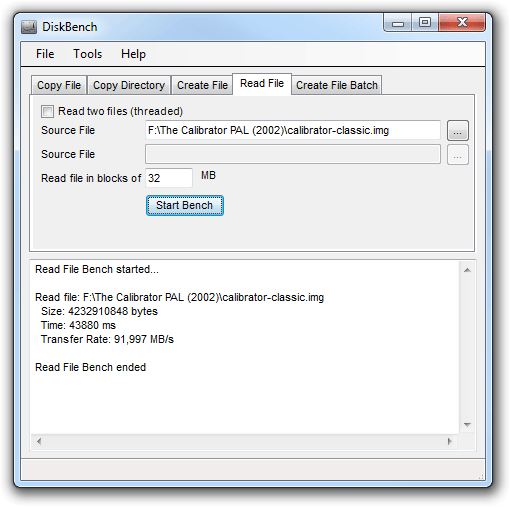
The program is using the current filesystem to save a file. If it is fragmented, the performance will be degraded, as it is in real life.
So, to figure out how fast your computer is, you can copy a file from A to B and use a stop watch.
Or you could just as easy use this program.
All it does is:
1) copies a file from A to B, times the time it took, and deletes the file from B again.
- or -
2) The other way to benchmark is to choose Create File. This way it just creates a file (consisting of a repeated 128 byte string). So if you only have one harddisk, this is the optimal test for you.
Here are some command line argument examples:
If /KeepDestination is added then c:\Dest is not deleted after the benchmark is completed.
It will read the files in chunks of 4 MB as specified by /BlockSize:4
It will write the files in 24 chunks as specified by /NoOfBlocks:24.
If /KeepDestination is added then the files C:\Temp\CreateThisFile and D:\CreateThisFileToo are not deleted after the benchmark is completed.
You can also specify /BlockSize in kB/MB/GB like this /BlockSize:2MB.
If the program crashes then decrease the BlockSize and increase NoOfBlocks to avoid the "out of memory" crash.
I did not create any installation kit for this program.
Please let me know if you want one, and I will create one, if more than 1% of you want to have an installation kit.
You will need to have .net framework installed.
You can get this from windowsupdate or from MSDN Downloads.
If you are wondering if it will contain any spyware etc, It doesn't. But don't take just our word for it:
4 other sites found our software to be free, and clean of any malware of any sort:
SoftPedia says:

FileCluster says:
SoftSea says:

DownloadTube says:
Ratings:
SoftwareCocktail.com: "Benchmark your hard drive with this small yet powerful utility".


5 of 5 and Editors Pick by Download Typhoon.

5 of 5 by Best Freeware Download.

5 of 5 by SoftSea.

5 of 5 by Best Software 4 Download.

5 of 5 by I love Free Software.

Editors Pick Top 4 Download.

Editors Pick DownloadRoute.
5 of 5 by softnews.ro
4 of 5 by benchmarkhq.ru
4 of 5 by superarchivos.com
4 of 5 by ttdown.com
4 of 5 by zzwater.com
4 of 5 by softodrom.ru
3,5 of 5 by softonic.com
3,5 of 5 by webattack.com
Purchase?
The tool is completely free!
The No Design Software Team